
5K monitor comparison · October 2026
Same 5K panel, two philosophies
27 inches, 5K, 218 ppi: on sharpness, the two displays are evenly matched under macOS. The difference comes down to the built-in camera and sound on one side, and HDR, contrast, connectivity and price on the other.
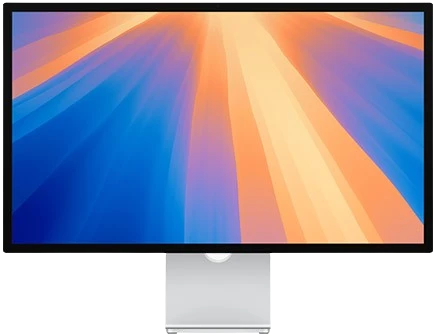
Apple Studio Display
2026 model · 5K · 60 Hz
From €1,699

The verdict at a glance
Which one is right for you?
Choose the Studio Display if…
- ✓you want a built-in webcam, microphones and speakers in the display
- ✓you work only on Mac and care about Apple design
- ✓you need Thunderbolt 5 to daisy-chain several displays
Choose the Kuycon G27P if…
- ✓you want the same 5K image for almost half the price
- ✓you are looking for better contrast (2000:1) and HDR
- ✓you also connect a PC, a console or several sources (USB-C, DisplayPort, HDMI)
Specifications
Head-to-head specs
| Studio Display | Kuycon G27P | |
|---|---|---|
| Size | 27" | 27" |
| Resolution | 5120 × 2880 (5K) | 5120 × 2880 (5K) |
| Pixel density | 218 ppi | 218 ppi |
| Panel | IPS | IPS Black |
| Contrast | Not published | 2000:1 |
| Brightness | 600 nits | 600 nits |
| HDR | No | HDR 600 |
| Colors | P3, 1 billion colors | 99% DCI-P3, 10-bit |
| Refresh rate | 60 Hz | 75 Hz |
| Finish | Glossy (nano-texture optional) | Glossy, anti-reflective |
| Video inputs | Thunderbolt 5 | USB-C, DisplayPort 1.4, HDMI 2.1 |
| Laptop charging | 96 W | 100 W |
| Additional ports | Thunderbolt 5 + 2 USB-C | 2 USB-C, 2 USB-A, 3.5 mm jack |
| Camera | 12 MP Center Stage | No |
| Microphones and speakers | 3 microphones, 6 speakers | No |
| Stand included | Tilt only (height adjustment: +€400) | Tilts and pivots 90° |
| VESA mount | Optional | Adapter included |
| Compatibility | Mac, iPad | Mac, iPad, PC, Linux, consoles |
| Starting price | €1,699 | €939 |
✓ = advantage. Apple values: specifications published by the manufacturer for the 2026 model. Prices include VAT, shown in your region's currency.
In detail
What really sets them apart
Sharpness: a perfect tie
Both displays show 5120 × 2880 pixels on 27 inches, which is 218 ppi. That is the density macOS is designed for: crisp text, a 2× scaled interface, and none of the scaling blur you get on a 27" 4K.
DrawContrast and HDR: advantage G27P
The G27P's IPS Black panel reaches 2000:1, with noticeably deeper blacks than a standard IPS. It also supports HDR content (HDR 600). The Studio Display remains an SDR display at 600 nits.
Kuycon G27PConnectivity: two philosophies
The Studio Display bets on Thunderbolt 5, ideal for a recent Mac and daisy-chained displays. The G27P accepts USB-C, DisplayPort and HDMI: a Mac, a laptop PC and a console can stay connected at the same time, with 100 W of charging over a single cable.
Depends on your useCamera and sound: advantage Apple
This is the Studio Display's real strength: a 12 MP camera with Center Stage, three studio-quality microphones and six speakers. The G27P is a pure display. If you already have a webcam or a headset, you lose nothing.
Apple Studio DisplayErgonomics: advantage G27P
The G27P's stand tilts and pivots 90° for portrait mode, and the VESA adapter is included. With Apple, height adjustment costs €400 extra and VESA mounting is an option.
Kuycon G27PPrice: advantage G27P
The G27P starts at €939, versus €1,699 for the Studio Display. With a comparable setup (height-adjustable stand, VESA mount), the Studio Display costs more than double.
Kuycon G27PConclusion
The same 5K, without paying for the camera
The Studio Display remains the simplest display for anyone living in the Apple ecosystem who wants everything built in. For everyone else, the Kuycon G27P delivers the same 5K sharpness, better contrast, HDR and more open connectivity, for a far more reasonable price.
Discover the Kuycon G27PFrequently asked questions
FAQ
Does the Kuycon G27P have the same resolution as the Studio Display?
Yes. Both displays have a 27-inch panel at 5120 × 2880 pixels, which is 218 pixels per inch. Under macOS the result is identical: HiDPI rendering at 2× scale, perfectly sharp text.
Does the G27P work with an Apple Silicon Mac?
Yes. It connects over USB-C to any Apple Silicon Mac (M1 and later) and to iPad Pro models, with 5K display, data transfer and up to 100 W of charging over a single cable.
Does the G27P have a camera or speakers?
No. The G27P is a display dedicated to the picture, with no camera, microphone or speakers. A 3.5 mm jack lets you connect headphones or speakers.
Can I connect a PC or a console to the G27P?
Yes. In addition to USB-C, it has a DisplayPort 1.4 and an HDMI 2.1 input. It works with Windows, Linux, PlayStation, Xbox and Nintendo Switch (at up to 4K 60 Hz over HDMI for consoles).
What is the warranty on the Kuycon G27P?
The G27P comes with a 2-year warranty, worldwide.
Go further
Comparison written in October 2026. Apple prices are indicative and may change; Kuycon prices are shown in your currency.