
Practical · 2026
The right batteries for your remote control
Your Kuycon monitor comes with an infrared remote control, but without batteries: air transport rules restrict how batteries can be shipped. To buy the right ones, you only need to know the colour of your remote.
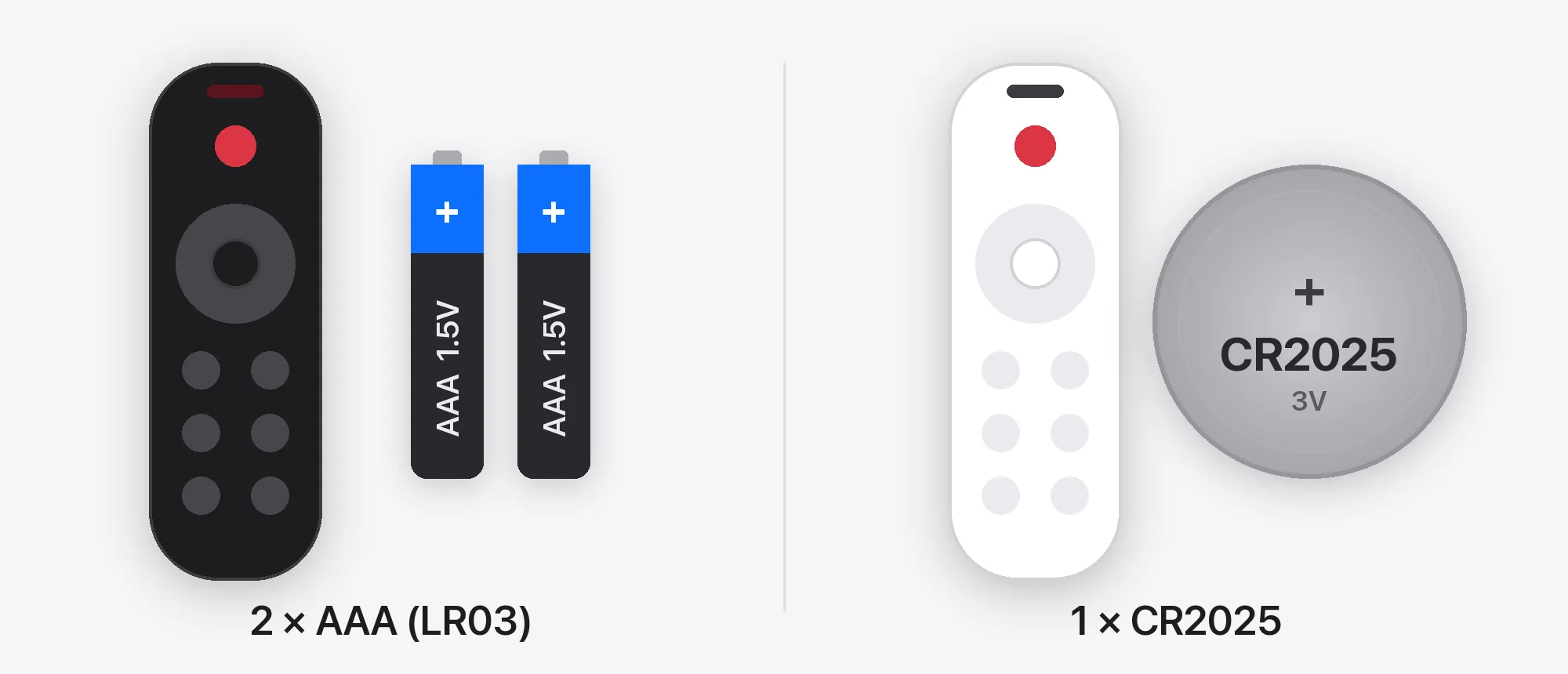
Why the batteries are not in the box
Batteries are subject to strict rules in air transport, in particular lithium button cells such as the CR2025. Because of these restrictions on shipping batteries by air, Kuycon remote controls are shipped without batteries.
The remote works with standard batteries, sold in supermarkets and electronics stores. Fit them once and the remote is ready to use.
Batteries
Which battery for which remote
| Remote control | Battery | Quantity |
|---|---|---|
| Black remote control | AAA (LR03), 1.5 V | 2 |
| White remote control | CR2025 lithium button cell, 3 V | 1 |
Only the colour of the remote control decides the battery. AAA batteries are also sold under the name LR03.
CR2025, CR2032, CR2016: not interchangeable
These three button cells share the same 20 mm diameter, and their last two digits give the thickness: 2.5 mm for the CR2025, 3.2 mm for the CR2032 and 1.6 mm for the CR2016. A CR2032 is too thick for a compartment designed for a CR2025, and a CR2016 too thin to make reliable contact.
For the white remote control, take a CR2025 and nothing else. For the black remote control, any AAA alkaline battery will do.
Fitting
Fit the batteries in three steps
Open the compartment
The battery compartment is on the back of the remote control. Open its cover or slide out its tray, depending on the remote.
Respect the polarity
Insert the batteries following the + and - marks shown in the compartment: two AAA batteries in the black remote, one CR2025 in the white remote.
Close and test
Close the compartment, point the remote at the front of the monitor and press the power button.
The remote still does not respond?
- Check the direction of the batteries: it is the most common cause.
- Aim at the front of the monitor. An infrared remote needs a clear line of sight to the monitor, with no object in between.
- Try new batteries from another pack: batteries left in a drawer for a long time may be flat.
- In the meantime, all settings remain available from the buttons on the monitor.
On a Mac, brightness can also be adjusted from the computer: see our brightness control guide. If the remote still does not respond with new batteries fitted the right way round, contact our customer service with your order number.
Button cells: keep them away from children
A swallowed lithium button cell can cause serious internal burns within a few hours. Store new and used CR2025 cells out of reach of children, and seek medical help immediately if one is swallowed.
Used batteries go to a collection point, never in household waste. In Europe, shops that sell batteries generally take them back.
FAQ
Remote control batteries: frequently asked questions
Which batteries does the Kuycon remote control use?
It depends on its colour. The black remote control uses two AAA batteries (LR03). The white remote control uses one CR2025 lithium button cell.
Why are the batteries not supplied?
Because of restrictions on shipping batteries by air, the remote controls are shipped without batteries. AAA batteries and CR2025 cells are easy to find in shops.
Can I use a CR2032 instead of a CR2025?
No. The CR2032 has the same diameter but is 3.2 mm thick instead of 2.5 mm, so it does not fit properly in the compartment. Use a CR2025.
Can I use the monitor without the remote control?
Yes. All settings are available from the buttons on the monitor. The remote is simply more convenient, for example to change input or adjust brightness from a distance.
The remote does not work with new batteries: what should I do?
Check the polarity, aim at the front of the monitor with nothing in between, and try batteries from another pack. If it still does not respond, contact our customer service.
Ready in two minutes
Two AAA batteries or one CR2025, and your remote control is ready. Every Kuycon monitor can also be adjusted with its own buttons.
See the rangeGuide written in October 2026.